Apple: SupplierCare Dashboard

The project focuses on redesigning the SupplierCare dashboard to offer a more intuitive and effective experience for users, particularly suppliers. The primary aim is to enable suppliers to track their progress towards meeting the ESCI (Environmental, Social, and Corporate Governance Integration) expectations, with an initial focus on the Climate 2030 goals. This involves creating a user-friendly interface where suppliers can easily access and manage their content/document assignments.
Previously, suppliers using SupplierCare had limited access to a 'whole picture' view of their requirements for meeting Apple's standards. Interaction with the system was primarily transactional, involving pushing individual file requirements to suppliers. As the scope of content and goal setting expands, there is a pressing need for a centralized dashboard. This dashboard would not only allow suppliers to monitor their progress towards set goals but also provide intuitive access to additional tools and services to support their journey. This enhancement is anticipated to significantly boost engagement and usability of SupplierCare for suppliers and various Lines of Business (LoBs).
Enhanced Dashboard for Intuitive User Experience: Redesign the dashboard to provide a more intuitive and user-friendly interface. This includes a clear mental model of the platform's capabilities for new users and an improved overview section for both internal and external users.
Advanced Search and Content Navigation: Implement advanced search functionality in the content dashboard to facilitate easier access to specific content and document assignments, addressing the issue of users currently needing to know exact content names to find what they need.
Clarity and Accessibility of User Roles and Expectations: Redesign the user interface to provide immediate understanding of user capabilities within SupplierCare, including separate sections for content authoring, task tracking, and a clear display of what actions are expected from users.
External User Management and Enhanced Communication Tools:
Integrate introductory content into new user invitation emails.
Upgrade the 'Ask Apple' feature for more cohesive communication threads.
Customize supplier notifications based on individual tasks and allow Apple users to control notification scheduling.
Clarify the relevance of interest emails for suppliers.
Implement functionality for scheduling with stakeholders based on shared availability.
Make notification mechanisms transparent to Apple users.
Ensure constant active user presence for effective notification delivery.
TPA Evaluation and Performance Tracking: Create an automated system for TPA evaluation, including data collection and consolidation, with an automated performance summary integrated with scoring from 'Visit' tabs.
Visibility of KPIs and Goal Progress: Enable suppliers to easily view key performance indicators, such as GHG inventory data and progress towards targets, along with achievements.
Resource Integration and Task Management: Design the dashboard to offer intuitive access to eLearning modules, digital tools, and task management features, all from a single platform.
Improved Collaboration and Project Management Features: Include functionalities for EEP Designated Responsible Individuals to manage project updates and communicate effectively, similar to platforms like Slack.
These objectives combine to transform the SupplierCare dashboard into a more dynamic, interactive, and informative platform. This redesign aims to cater to the evolving needs of suppliers, enhance user engagement, and streamline task management and communication within the SupplierCare system.

Immersion: Understanding the User's World
In our quest to revamp the SupplierCare dashboard, we embarked on an immersion journey to deeply understand our users' environment, challenges, and daily interactions with the system. This step was pivotal in grounding our design process in real-world contexts and ensuring that our redesign met the actual needs of the users.
User Environment Analysis
Contextual Inquiry
To gain firsthand insights, we conducted contextual inquiries. This involved observing users in their natural environment, using SupplierCare. These observations provided a clearer picture of how users navigate through the platform, highlighting areas where they struggled or found the interface counterintuitive.
Interviews
In the discovery stage, a key method for understanding the user experience in SupplierCare was through in-depth interviews. These interviews were focused on three major user personas: internal staff, third-party administrators (TPAs), and suppliers. The primary goal was to uncover user pain points and explore opportunities for enhancing user experience.
The main objective of these interviews was to delve into the user experience, identify pain points, and gather insights for improving the platform.
The outcomes from these interviews were instrumental in identifying specific user needs and pain points. The feedback obtained not only highlighted the shortcomings of the current system but also shed light on user expectations and preferences. This rich qualitative data played a pivotal role in guiding the design process, ensuring that the subsequent iterations of SupplierCare were more user-centric and tailored to the needs of each user group.

Interpretation of Findings
The data was analyzed from our in-depth interviews with internal staff, third-party administrators (TPAs), and suppliers. This analysis was pivotal in transforming the raw, qualitative data into actionable insights, guiding our design decisions for the platform's enhancement.
Organizing and Analyzing Data

Interview Summary: Unvailing User Experience in SupplierCare
Internal Staff

Third-Party Administrators (TPAs)

Suppliers

Identification of Theme
The feedback and data collected from the interviews have been synthesized into distinct themes that encapsulate the core challenges and desires of the users within SupplierCare. These themes help us to better understand and address the specific pain points expressed by internal staff, third-party administrators (TPAs), and suppliers.
Data Management and Accessibility
Users find it difficult to manage and access data efficiently due to poor task management systems and inadequate search functionality.
Customization and Personalization
Suppliers express a desire for a dashboard that can be customized to display pertinent information at a glance, reducing the complexity of accessing vital data.
Navigation and Usability
Users struggle with the platform's interface, finding it unintuitive and challenging to navigate, particularly for new users who face a steep learning curve.
Communication and Collaboration
There is a clear need for improved communication functionalities that streamline interactions between suppliers, TPAs, and internal staff.
Language and Localization
The incomplete translation from English to Chinese impedes usability for non-English speaking users, reflecting the need for a fully localized interface.
Training and Support
The lack of comprehensive tutorial videos and error messages leaves users without the necessary support to troubleshoot and navigate the platform effectively.
Storytelling
In the discovery stage, a key method for understanding the user experience in SupplierCare was through in-depth interviews. These interviews were focused on three major user personas: internal staff, third-party administrators (TPAs), and suppliers. The primary goal was to uncover user pain points and explore opportunities for enhancing user experience.
The main objective of these interviews was to delve into the user experience, identify pain points, and gather insights for improving the platform.
The outcomes from these interviews were instrumental in identifying specific user needs and pain points. The feedback obtained not only highlighted the shortcomings of the current system but also shed light on user expectations and preferences. This rich qualitative data played a pivotal role in guiding the design process, ensuring that the subsequent iterations of SupplierCare were more user-centric and tailored to the needs of each user group.
Sorting and Condensing
The data was analyzed from our in-depth interviews with internal staff, third-party administrators (TPAs), and suppliers. This analysis was pivotal in transforming the raw, qualitative data into actionable insights, guiding our design decisions for the platform's enhancement.
5W Analysis: The Core of SupplierCare's User Experience

Framing Opportunities
In identifying and framing opportunities, we're translating user feedback into actionable design initiatives. This phase is about envisioning a future where SupplierCare not only meets but anticipates user needs, fostering an environment of efficiency, engagement, and satisfaction.
Bridging Gaps with User-Driven Design

Setting the Design Challenge
It's a mission statement that frames our intentions and aspirations for the SupplierCare platform. Each challenge is a reflection of our commitment to turn the opportunities and insights gained from our users into tangible enhancements. We're not just solving problems; we're reimagining the way SupplierCare empowers its users.
Challenge 1
How can we create a dashboard that intuitively guides users to their desired actions while providing a clear overview of their tasks and progress?
Challenge 2
What design solutions can we implement to streamline and personalize communication, ensuring that every user interaction within SupplierCare is efficient and meaningful?
Challenge 3
In what ways can we refine data management to provide users with immediate access to accurate and relevant data with minimal effort?
Designing
Moving from challenges to design, we embrace a user-centered approach that focuses on creating designs that are not only visually appealing but also highly functional and intuitive.
Intuitive Supplier Dashboard: Streamlined for Efficiency and Clarity

Evaluation Interface for TPAs: Enhancing Oversight and Feedback


Revamped Internal Admin Dashboard: Centralized Control and Insight
A redesigned dashboard offering a comprehensive overview, tailored for internal admin efficiency and decision-making
Supplier Management Page: Streamlined Access and Interaction
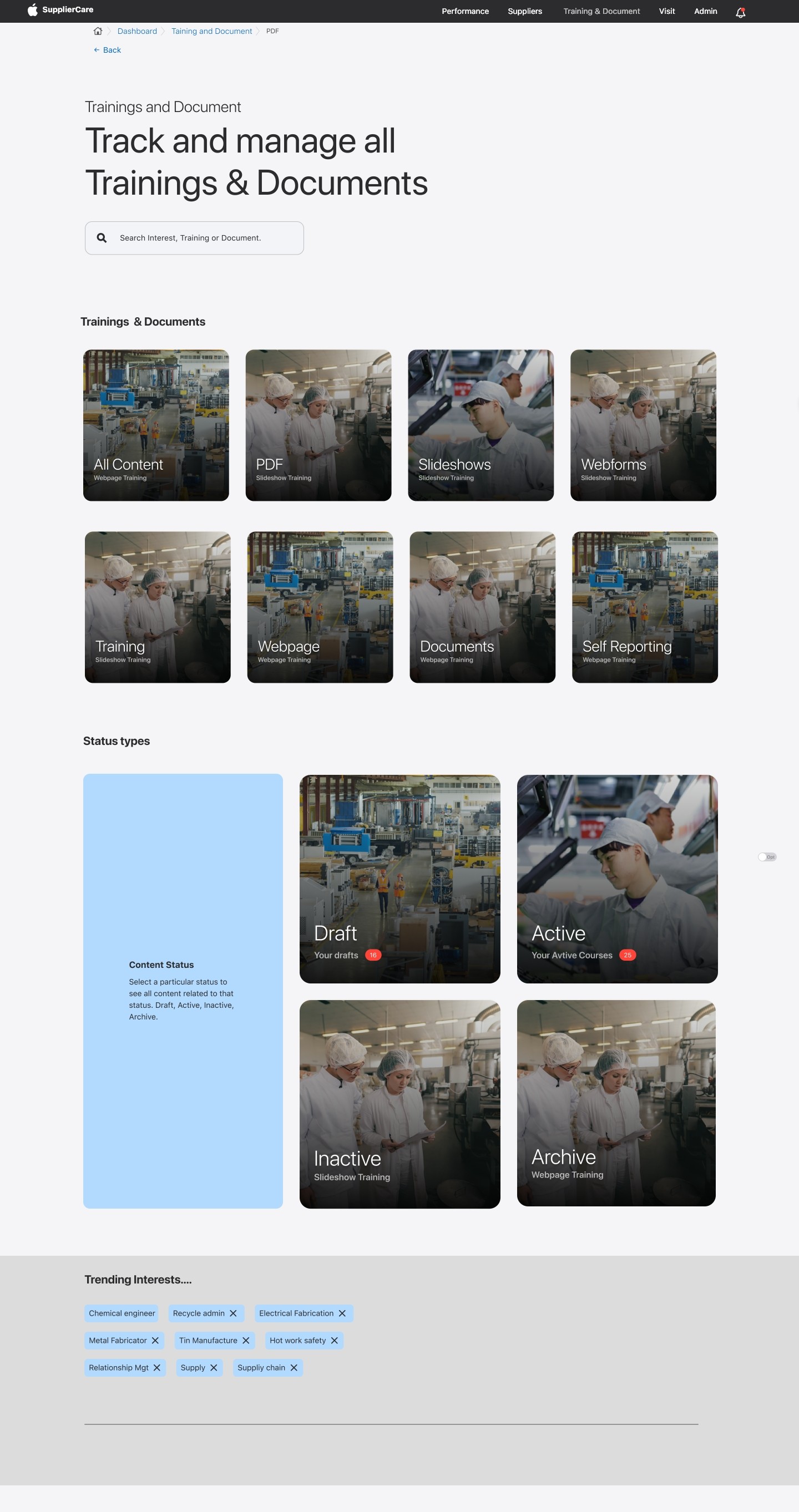
A well-structured page for training and documentation, designed to simplify access and improve the educational resources management.


Enhanced Notification Interface: Customizable and User-Friendly
