REJI

Overview
The Racial Equity and Justice Initiative (REJI) is a groundbreaking project powered by Apple designed to empower and support Black, Brown, and Indigenous-owned businesses. At its core, REJI focuses on fostering innovation and commitment to environmental sustainability within these communities. The project employs a design-thinking approach to ensure that solutions are not only innovative but also deeply rooted in the needs and aspirations of its users.
Through this initiative, businesses receive customized training, access to a wide range of resources, including Apple experts, and integration into an expanding alumni network. The project is uniquely tailored to assist these businesses in reaching their next stage of development, offering a blend of theoretical knowledge and practical application.
Objectives of the REJI Project
Empowerment of Targeted Businesses: Equip Black-, Brown-, and Indigenous-owned businesses with the tools, knowledge, and resources necessary to thrive in a competitive marketplace.
Innovation and Environmental Commitment: Encourage and support innovation in business practices, with a strong emphasis on environmental sustainability and responsibility.
Application of D5E UX Process: Utilize the D5E UX process to ensure a user-centered approach in all initiatives, making certain that solutions are tailored to the specific needs and challenges of the businesses involved.
Customized Training and Expert Access: Provide targeted businesses with customized training opportunities and direct access to industry experts, enhancing their skills and knowledge base.
Network Expansion and Community Building: Foster a sense of community among participating businesses, facilitating knowledge exchange and collaboration through an expanding alumni network.
Sustainable Growth and Development: Assist businesses in achieving sustainable growth, focusing on long-term success and the ability to adapt to changing market dynamics.
Measurable Impact: Establish clear metrics for success, ensuring that the impact of the initiative is tangible, significant, and aligned with the overall goals of promoting racial equity and justice in business.

Discover
Immersion
Questionnaires and Interviews
Self-Documentation
Meetings
UX Observation
Immerse in Apple's Supplier Care World
In our quest to refine Supplier Care's user experience, we embarked on an extensive exploration of leading document management and compliance tools. We delved into the functionalities and user interfaces of tools like SharePoint, Dropbox Business, DocuWare, and M-Files for document management insights.
Simultaneously, we examined the compliance landscape through tools like ComplianceQuest, StandardFusion, LogicGate, NAVEX Global, and MetricStream. This comprehensive immersion into both domains equipped us with a broader perspective and critical insights, enabling us to benchmark Supplier Care's current system against the best in the industry. This knowledge forms the bedrock of our approach to elevating Supplier Care's UX, ensuring it meets and exceeds the evolving standards of efficiency, user-friendliness, and compliance.
Competitive Analysis: Benchmarking Supplier Care Against Industry Leaders in Document Management and Compliance
This comparative analysis is pivotal in identifying key features, strengths, and opportunities for enhancing Supplier Care's user experience. By benchmarking against the best in the industry, we aim to integrate these insights into Supplier Care's design, ensuring it not only meets but surpasses current standards and expectations.
Document Management Systems (DMS) Analysis

Exploring the World of Compliance Tools

Questionnaires & Interviews: Gleaning Insights from Users and Stakeholders
In pursuit to enhance Supplier Care's user experience, we embarked on a series of remote user interviews, engaging both customers and stakeholders. These interviews were focused on uncovering their pain points, as well as gathering their valuable input on desired features and improvements.
Key Insights from User Interviews:


The rich data obtained from these interviews is instrumental in guiding our next steps. It not only validates the areas that need improvement but also provides a clear direction for the design enhancements we aim to implement. By closely listening to both users and stakeholders, we ensure that the evolution of Supplier Care is deeply aligned with the needs and aspirations of its core users.
Self-Documentation: Capturing User-Driven Data for Supplier Care Enhancement
We monitored how users interact with SupplierCare system. This step was instrumental in unveiling the subtle nuances and patterns of user behavior that are critical for driving UX improvements. Based on our comprehensive understanding of user pain points and feature requests, we focused on several key areas:
Training Visibility: Users find it challenging to locate non-mandatory training, indicating a need for a more prominent and accessible search function.
Ease of Navigation: There's a difficulty in navigating to specific training, with calls for a more intuitive system layout.
Categorization: Administrators request a feature for categorizing trainings based on specific SupplierCare initiatives, such as carbon neutrality programs.
Training Linkage: A need for linking trainings to SupplierCare's various initiatives was highlighted to streamline administrative tasks.
Program Overview: Learners expressed a desire for a dashboard that provides an overview of the programs they are enrolled in.
Navigation to Programs: From their program overviews, users want to see available options and navigate easily to other programs.
Weekly Email Digests: Administrators would benefit from a feature that sends weekly email digests summarizing all assigned training.
Date Display: There is a request to remove the assigned date from listings and more accurately display due dates.
Content Structure: The current content structure is confusing, making it difficult to know what the latest or required items are.
Item Differentiation: Users find it difficult to differentiate related items and select the correct one from many similar options.
Interface Clutter: There is a need for the ability to delete unwanted items to avoid clutter and confusion.
Landing Page Access: A feature request for a landing page that easily accesses new updates and content was made to improve user experience.
These UX Observations have provided us with a wealth of data, enabling us to pinpoint exactly where enhancements are needed to elevate the user experience.

Define
Identification of Theme
Storytelling
Sort & Condence
Identification of Theme
The primary objective was to distill the collected data into coherent themes. Here’s how we approached the Identification of Themes:
Enhanced Searchability and Visibility
Pain Points: Difficulty in locating non-mandatory training and an inconspicuous search bar.
Intuitive Navigation and User Journey
Challenges in navigating to training and through the LMS content structure.
Personalized Training Experience
Pain Points: Inadequate overview of enrolled programs and lack of personalized training pathways.
Streamlined Administrative Operations
Pain Points: Complexity in linking trainings to initiatives and the need for automated communication.
Clear Content Differentiation and Management
Pain Points: Confusion between similar items, content clutter, and unclear date listings.
Engaging and Informative Updates
Pain Points: Difficulty in accessing new updates and content relevant to the user's interests.
Brand Cohesion Across All Features
Pain Points: The system's look and feel do not reflect the main brand identity, leading to a disconnect between user expectations and the actual experience.
Crafting User Stories
Turning our data into engaging stories that reflect the real experiences of SupplierCare's users. These narratives go beyond the numbers, giving life to the frustrations and successes users encounter daily.
User-Centric Narratives
We have woven the varied experiences of SupplierCare's users into stories that highlight their challenges, aspirations, and interactions with the system. These narratives shed light on the user's quest for a system that not only functions smoothly but also feels like an extension of the SupplierCare brand they recognize and trust.
Journey of the Admin
One narrative follows an admin persona who spends considerable time linking training modules to specific company initiatives. Their story reveals the need for a more intuitive backend process, reducing time spent on manual tasks and allowing for a focus on more strategic activities.
Learner's Pathway
Another story centers on a user eager to grow their skills through SupplierCare's LMS. They encounter obstacles like hard-to-find courses and an overwhelming array of similar training materials. Their journey underscores the need for a personalized and streamlined learning experience, aligned with the brand's promise of innovation and excellence
Brand Harmony
A recurring theme in our stories is the users' desire for a system that reflects the familiar SupplierCare brand. These narratives illustrate how a disconnect between the system's interface and the brand identity can impact user satisfaction and engagement
Sort & Condense: Action Plan Categorization
We monitored how users interact with SupplierCare system. This step was instrumental in unveiling the subtle nuances and patterns of user behavior that are critical for driving UX improvements. Based on our comprehensive understanding of user pain points and feature requests, we focused on several key areas


Develop
In the design stage of Apricot's system, we're focused on creating features that directly respond to user needs for clarity and engagement. We aim to introduce intuitive design elements that make navigating and using the system a seamless and enjoyable experience.
Landing Page and Onboarding
Tailored Onboarding: Understanding User Interests for Customized Course Suggestions
Interactive Onboarding: Users will be greeted with an engaging onboarding experience that inquires about their professional interests, learning goals, and preferred topics.

Revamping the LMS Experience: Intuitive Dashboard and Engaging Course Previews
enhancements focus on the user's interaction with the LMS dashboard, single course preview, and pathway preview, ensuring a seamless and engaging learning experience.


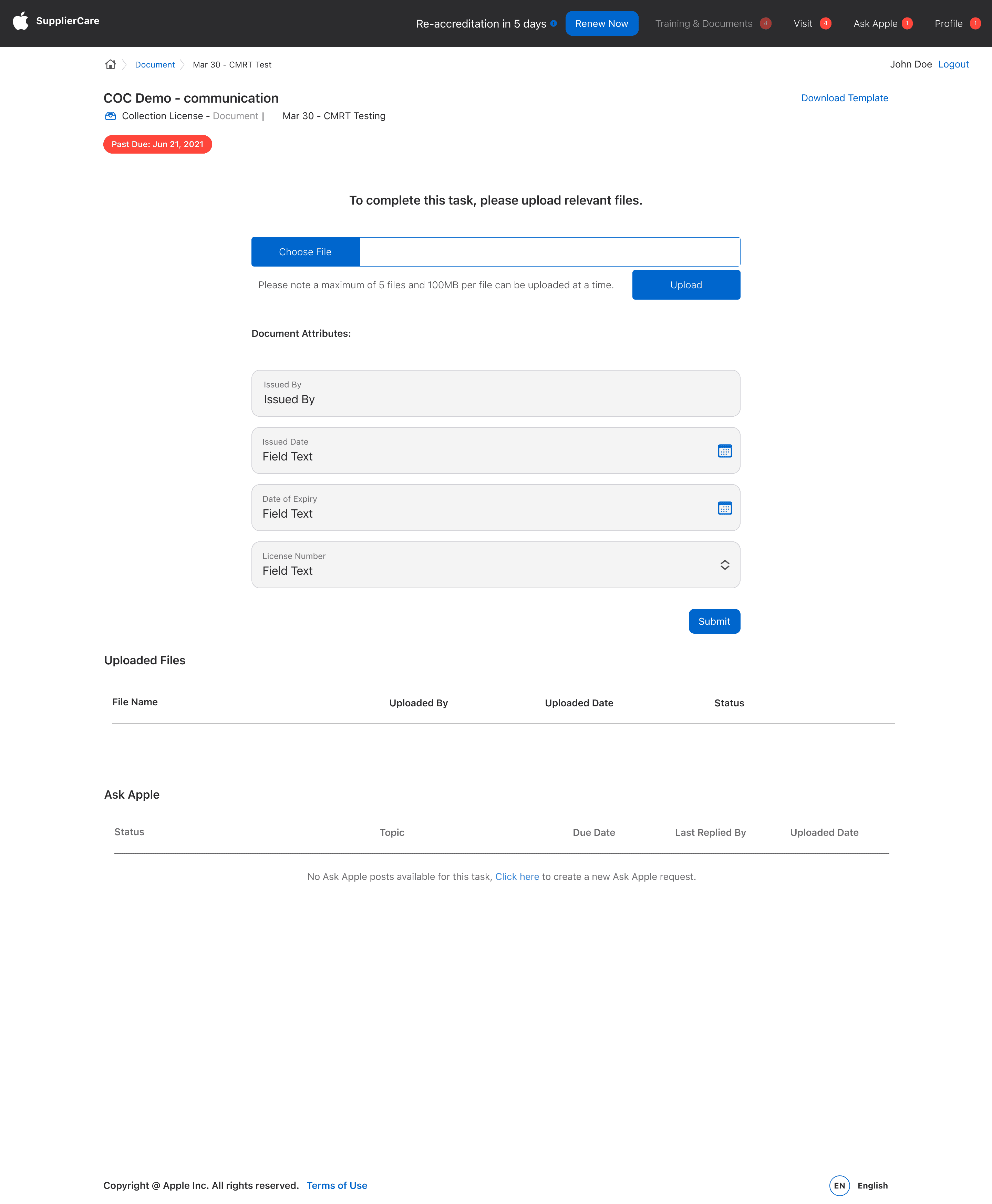
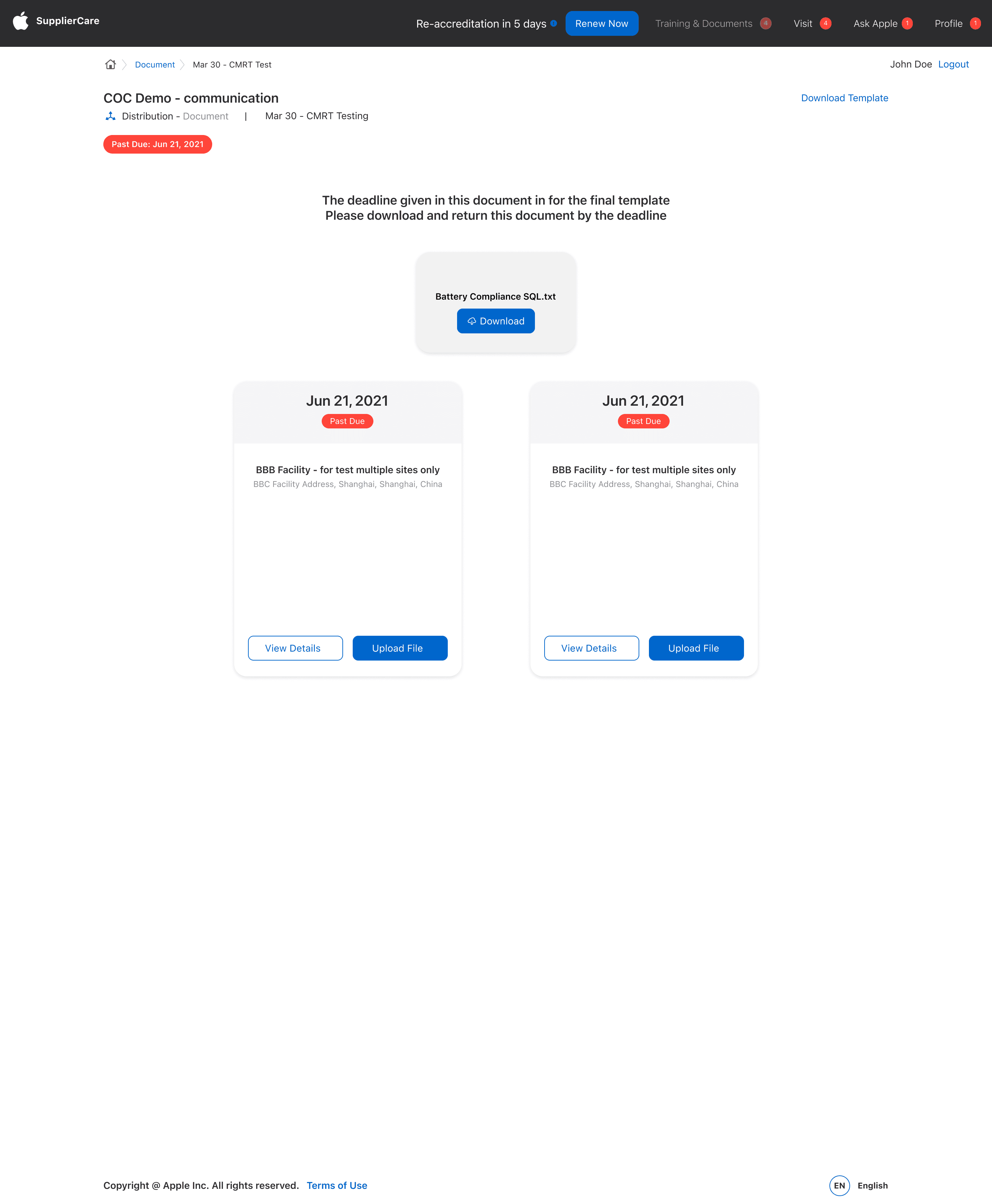
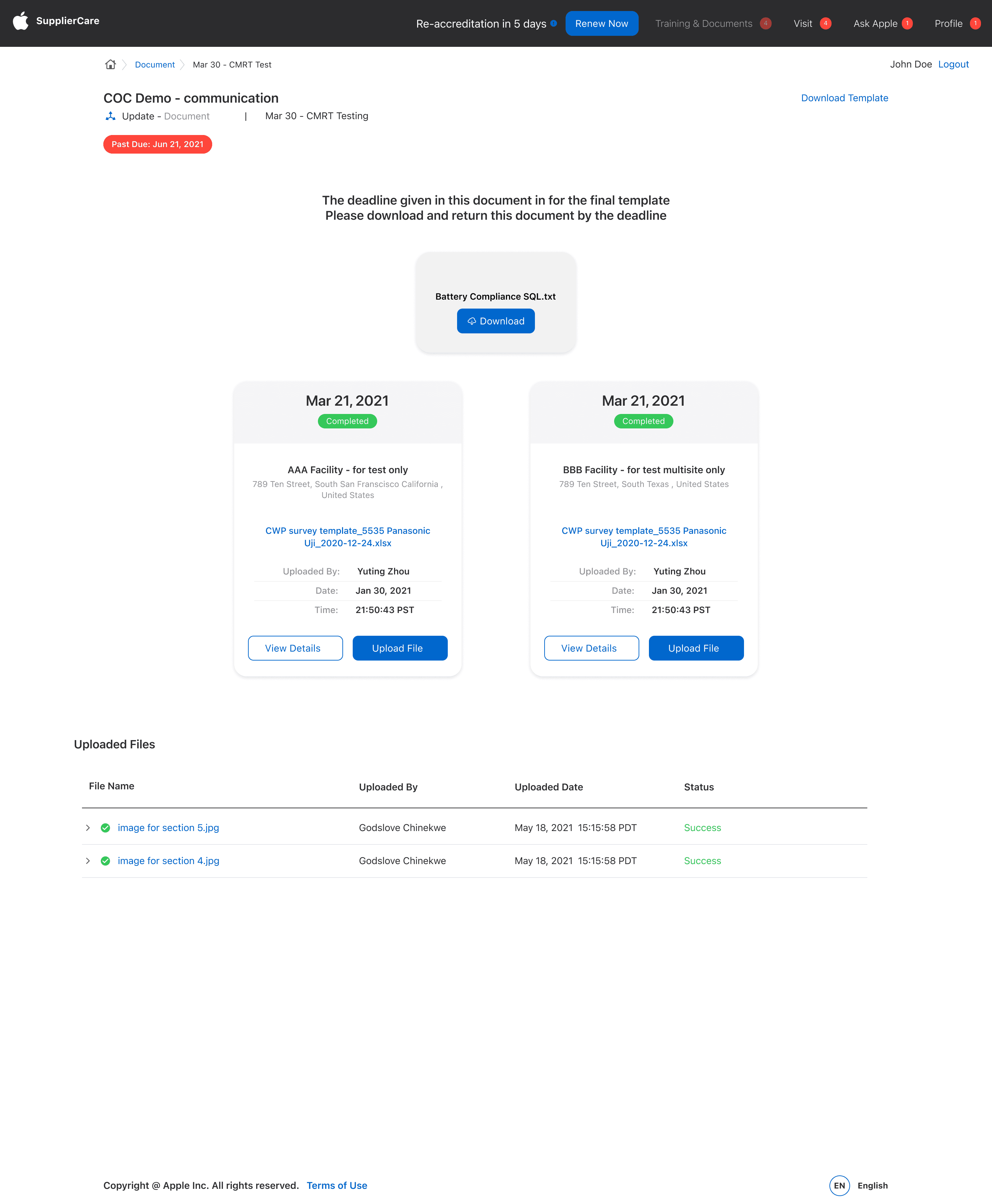
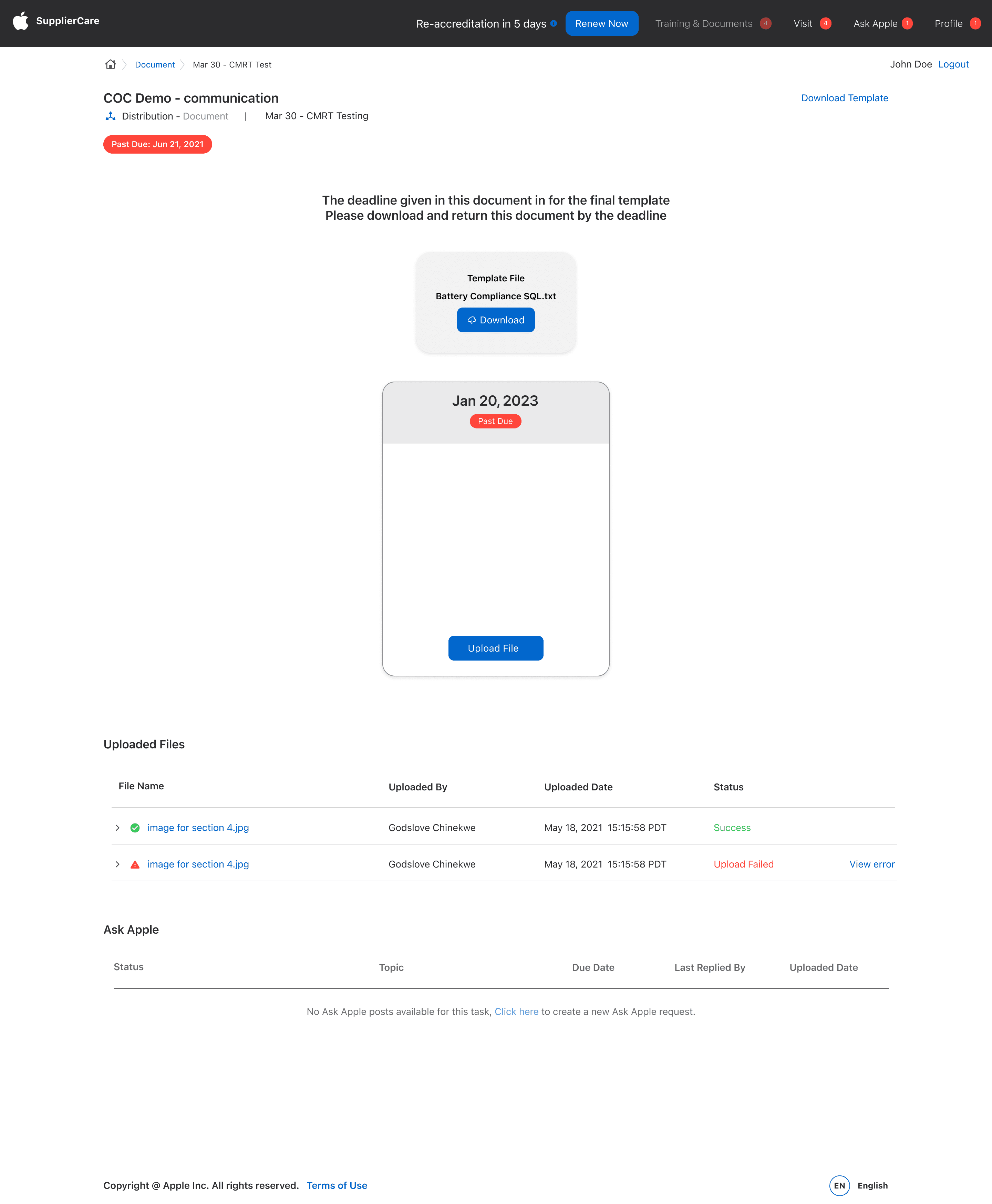
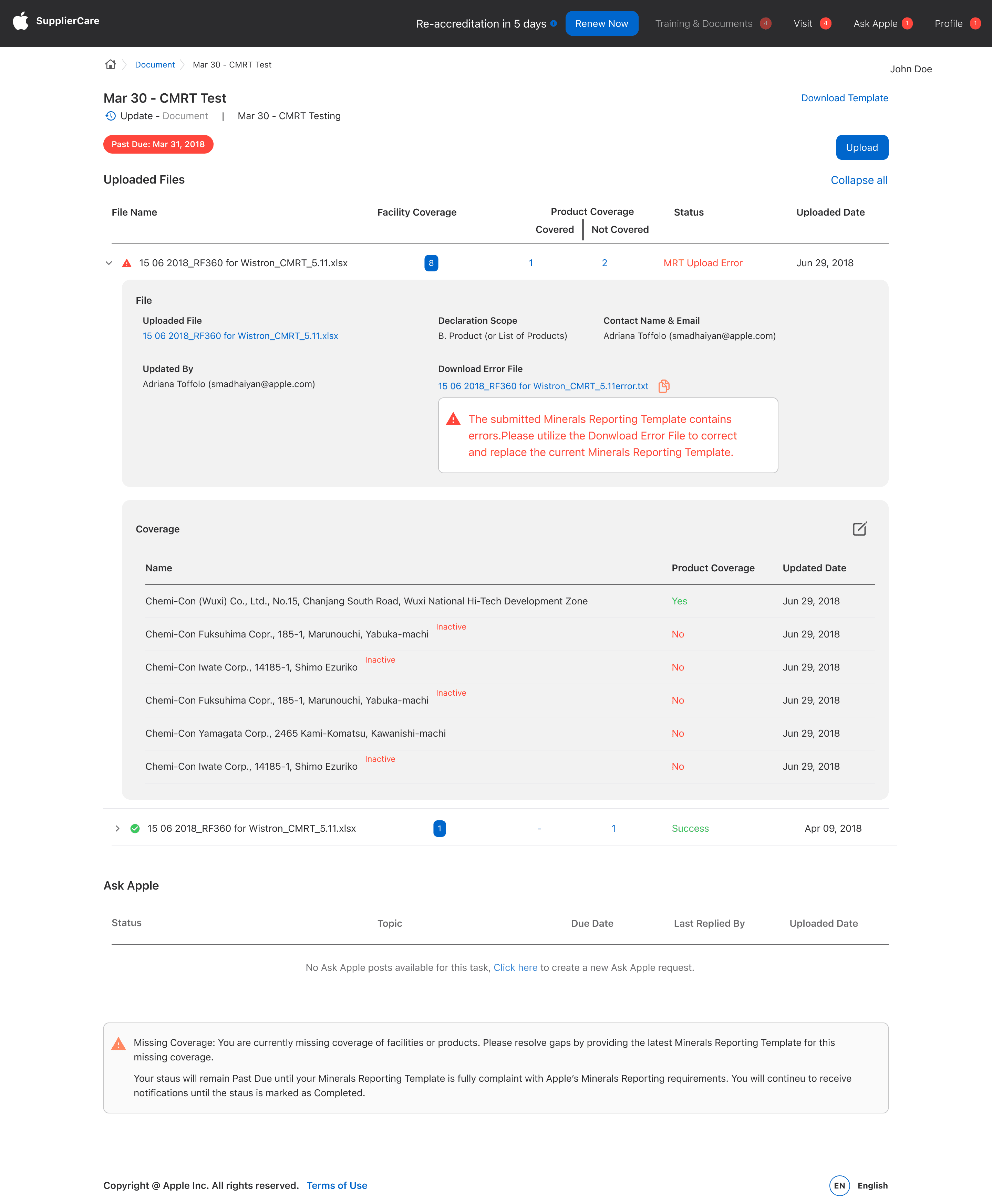
Optimizing Efficiency: User-Centric Design for Document Tasks Page
In our ongoing efforts to enhance Supplier Care's system, we're focusing on the Document Tasks page, aiming to create an organized and efficient workspace for users.
The redesigned Document Tasks page features a clean, structured layout, making it easy for users to find and manage their documents and tasks.

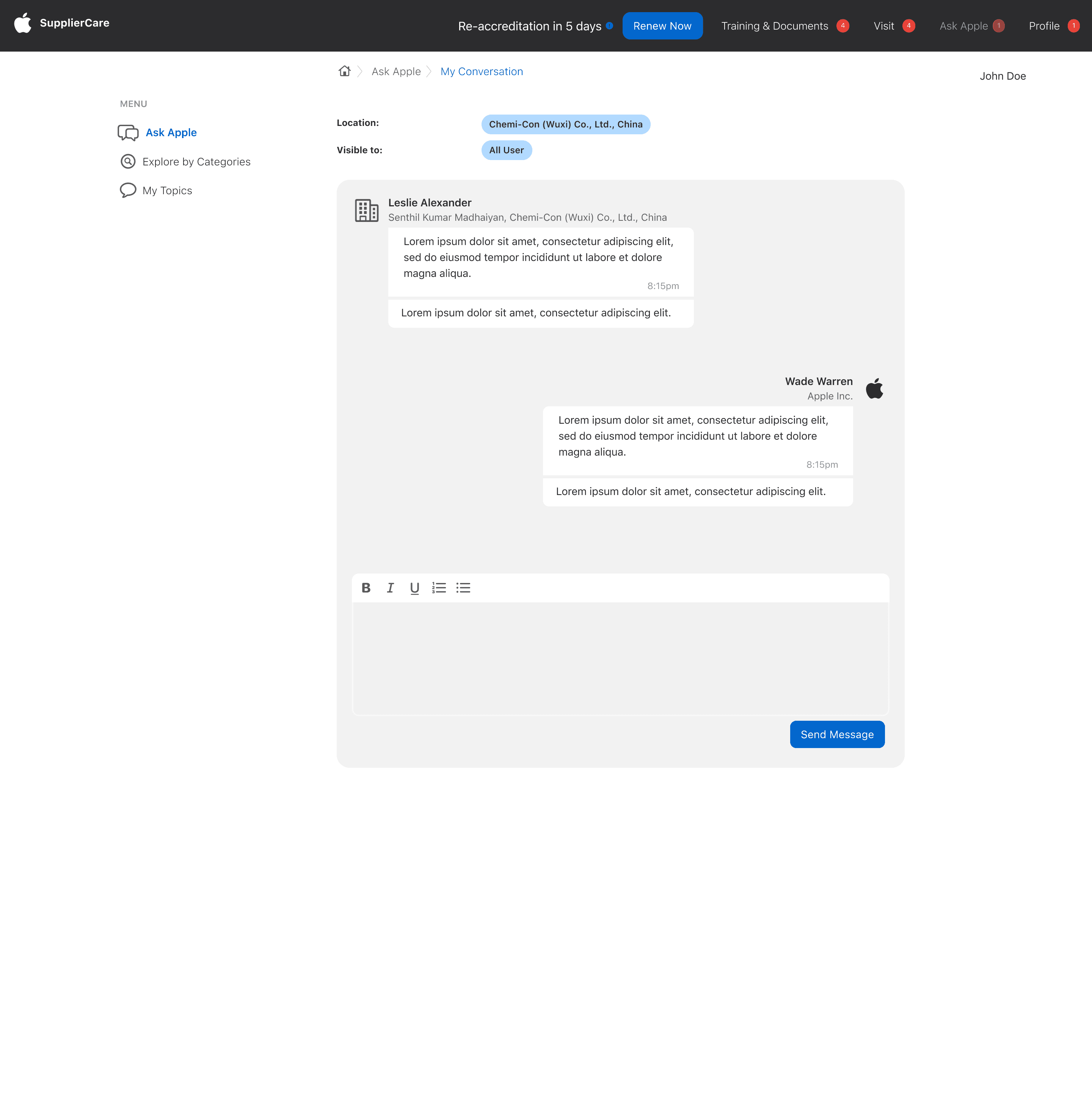
Ask Apple and Forums



Revitalizing the Facility Profile Page
The profile page will be designed for easy access to all facility account details, providing users with a clear overview and the ability to manage their information effortlessly.


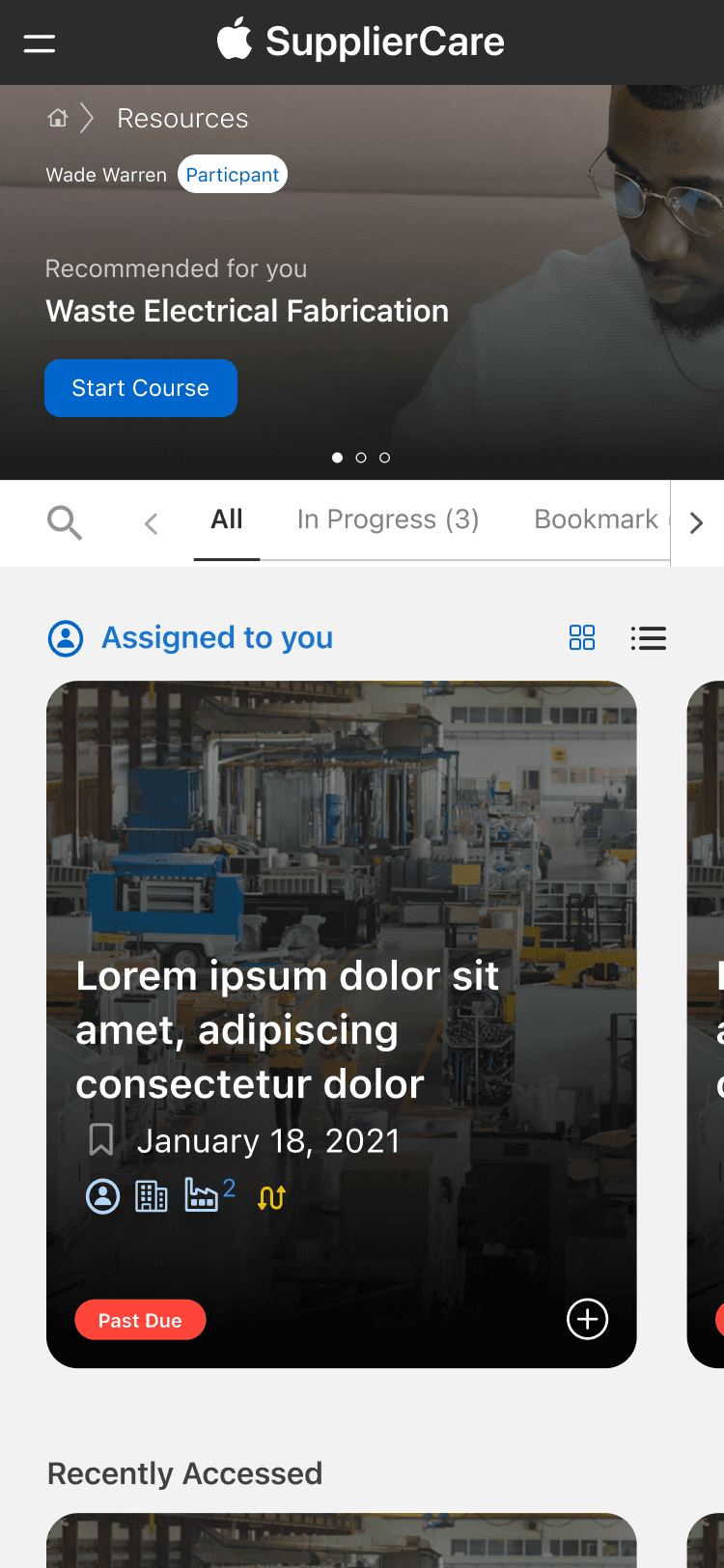
Responsive Mobile Experience
Highlights of the responsive mobile design of Supplier Care's system, demonstrating its adaptability across various devices. The selected screenshots showcase how the site maintains functionality and user experience seamlessly on mobile platforms.